Revara: Drive Tracker & 0-60
Revara turns an Android phone into a driver's instrument panel. Tap Start Drive and it records speed, distance, time, G-force and your route; when you finish, you get a report with a map, a speed graph and a card you can share. It is for drivers who want a GPS speedometer, a G-force meter and 0-60 timing in one app, without an account.
Free to download. Revara Pro: $29.99 a year with a 3-day free trial, or $6.99 a month (US prices as listed).
When to use Revara.
Revara is for people who like to see the numbers behind a drive: a live speedometer and G-force meter on the dash, and a saved record of every trip afterwards.
- You want a GPS speedometer in mph or km/h, as a gauge or a big digital number.
- You want to see cornering, braking and acceleration as live G-force.
- You time 0-60 mph, 0-100 km/h or the quarter mile, where it is legal, such as on a closed track.
- You drive at night and want a HUD mode that mirrors the speed onto the windshield.
- You want every drive saved with its route, distance, average and top speed.
- You want to share a drive as an image in Story (9:16) or Post (1:1) format.
What Revara does.
Live on the dash
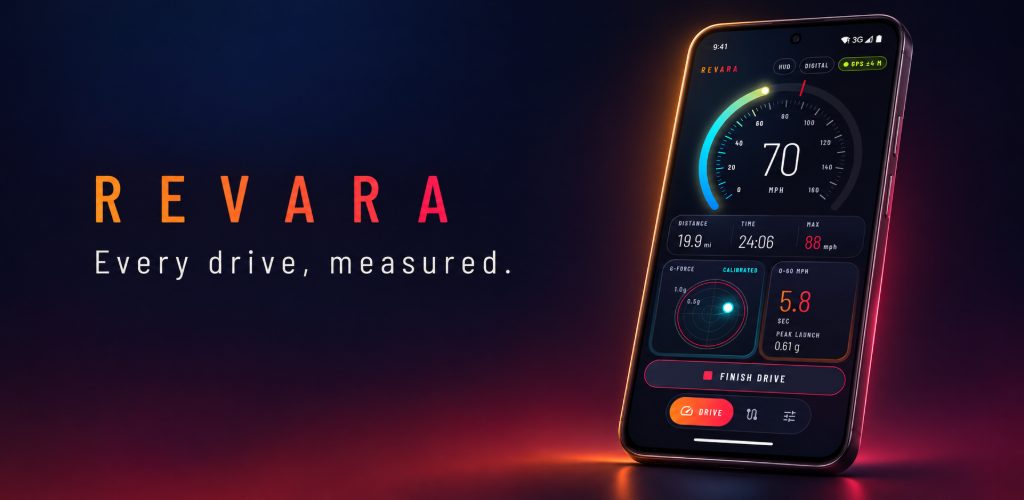
GPS speedometer, distance, time and max speed for the drive, in mph or km/h.
G-force meter
A live trail of cornering, braking and acceleration from the phone's motion sensors.
0–60 and 0–100 timing
Starts on its own when you pull away from a stop. Personal bests for 0-60 and the quarter mile are kept in your garage.
HUD mode
Lay the phone under the windshield at night and read the mirrored speed in the glass, or keep it in a holder in normal mode.
Report after every drive
Route map coloured by speed, distance, time, average and top speed, elevation range and a speed graph from start to finish.
Your garage
All your drives in one place, with all-time totals and personal bests.
The facts, in one place.
- Platforms
- Android (Google Play)
- Price
- Free to download. Free includes everything live on the dash, the drive report with the map, the share card and your last 10 drives. Revara Pro adds saved timing results (0-60, 0-100, quarter mile), G-force peaks, personal bests and your full drive history: $29.99 a year with a 3-day free trial, or $6.99 a month. Prices may vary by country.
- Account
- None. No sign-up.
- Connection
- Recording works without a connection; the map needs one to load.
- Language
- English
- Store category
- Auto & Vehicles
- Publisher
- CodeEnsis Ltd (Cyprus)
Where your data goes.
No account, no ads and no server of ours. Revara uses location and motion sensors only while you are recording a drive, and every drive, route and run time stays on your phone. To draw a drive's map it downloads map tiles from Thunderforest. Subscriptions go through Google Play and RevenueCat. Anonymous usage statistics and crash reports (Google Firebase), and an install signal for our ads (Meta), are sent only if you agree during setup, and you can change that in Settings.
Full details: Revara Privacy Policy · Terms of Use
The short version.
Does Revara need an internet connection?
Recording a drive works without a connection, using the phone's GPS and motion sensors. The route map needs a connection to load.
How does the 0-60 timer start?
It starts on its own when you pull away from a stop and times 0-60 mph or 0-100 km/h. Use timing only where it is legal, such as a closed track.
What is free and what is Pro?
Free: everything live on the dash, the drive report with the map, the share card and your last 10 drives. Pro adds saved timing results (0-60, 0-100, quarter mile), G-force peaks, personal bests and your full drive history.
How much is Revara Pro?
The Play listing states $29.99 a year with a 3-day free trial, or $6.99 a month. Prices may vary by country. The subscription renews automatically unless cancelled at least 24 hours before the end of the period, in Google Play > Subscriptions.
Does Revara track me in the background?
No. Location is used only while a drive is being recorded, and Revara does not ask for background location. Drives are stored on your phone, not on a server.
Every drive, measured.
Speedometer, G-force and 0-60 on the dash; a map and a speed graph after every drive. No account.
Drive safely. Set Revara up before you drive, obey traffic laws and keep your eyes on the road. Use timing only where it is legal, such as a closed track.